30 Years of Business Lessons on Embracing Technology
The single greatest way to succeed with technology in your business is to fail.
What? Yeah, I said it.
My story of 30 years in deep technological integration is rife with failure — which is exactly how I learned what didn’t work and how I leaned into what did. And I experienced immense success when I approached technology with care, respect and tenacity.
And this is why I’m passionate about this topic.
This past May, I had the pleasure of speaking at the inaugural Cherry Bekaert Tech Summit in Atlanta, GA.
Before I began working at Suite Engine, an IP brand owned by Cherry Bekaert, I was asked to participate in this event as a speaker.
My new mantra in life has been to “say yes,” so I said yes to four sessions.
I am now learning how to say “no” as four sessions in four hours was a lot. ;)
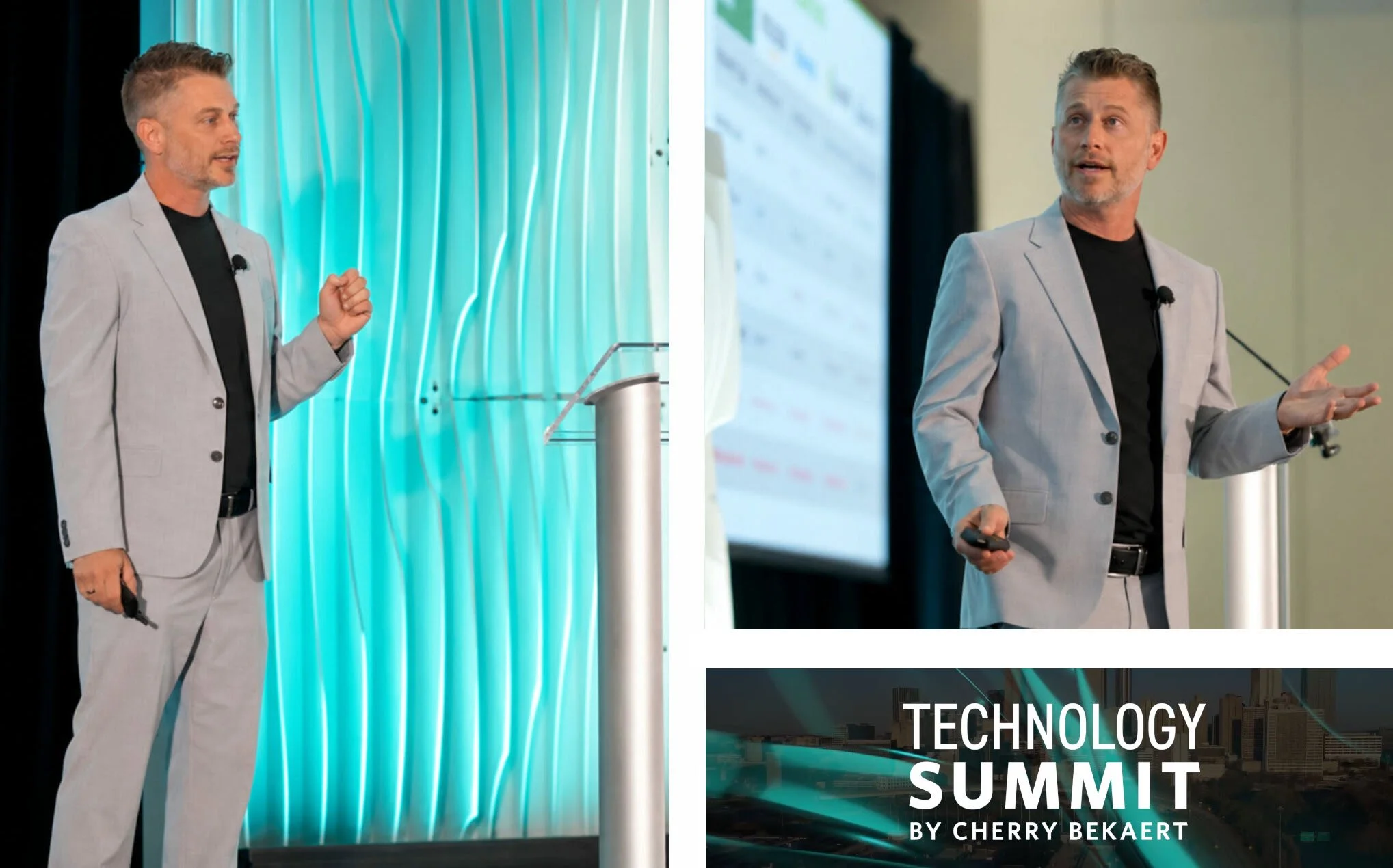
Taking the stage at the inaugural Cherry Bekaert Tech Summit (Finance Modernization, IT Strategy & Governance and AI & Automation)
Nonetheless, it was an absolutely fantastic experience. I met many amazing people, and I enjoyed the receptive audiences and feedback I received at my sessions.

The Tech Summit was hosted at the beautiful downtown Grand Hyatt // amazing networking opportunity with like-minded colleagues
I am going to summarize the content of three of these sessions in this article, which will include real-world experiences and advice to create a more bulletproof system.
My Credentials:
At the risk of this sounding too self-promotional, I feel like it warrants disclosure so you know these aren’t the ramblings of an inexperienced mad man.
Just those of an experienced mad man. :S
Developed software (using AREXX), customized and operated two bulletin board systems in the early ’90s
Developed five video games (using AMOS Professional) on the Commodore Amiga in the mid-’90s
Started in basic HTML in 1995, enrolling in and being asked to teach Minnesota’s first internet-based college class
Helped build and launch one of the first eCommerce sites in October of 1996 (exactly 30 years ago)
Helped run and operate a desktop PC custom build shop
Custom built and launched one of the first social networking sites while learning how to handle mass traffic
Launched a full-service commercial software solution company to help other businesses in distribution
Developed software (using Adobe ColdFusion) to completely rebuild eCommerce operations and back-end ERP integrations (2000-2025)
Deployed countless ERP integrations/migrations and tech stack solutions
I’m breaking down this blog into three primary categories that closely mirror the talk tracks I brought with me to the Tech Summit. They are as follows:
Integrated Technology
Technical Debt
IT Coverage
Let’s get into it.
Integrated Technology
A big buzzword in business these days is “modernization.” There is a concerted push to ensure businesses are running current, supported versions of their critical technology solutions while ensuring those systems communicate seamlessly with one another.
Modernization simply refers to the updating of legacy, monolithic systems to cloud-native architectures that result in scalability, security and agility. That is a bit of a mouthful, but let’s explore how this pertains to integration.
Most mid-market businesses are disconnected. Since most systems have not historically been natively designed to talk to each other, data lives in silos. To ensure data is congruent, you have to resort to manual entry, which has a 1-3% error rate.
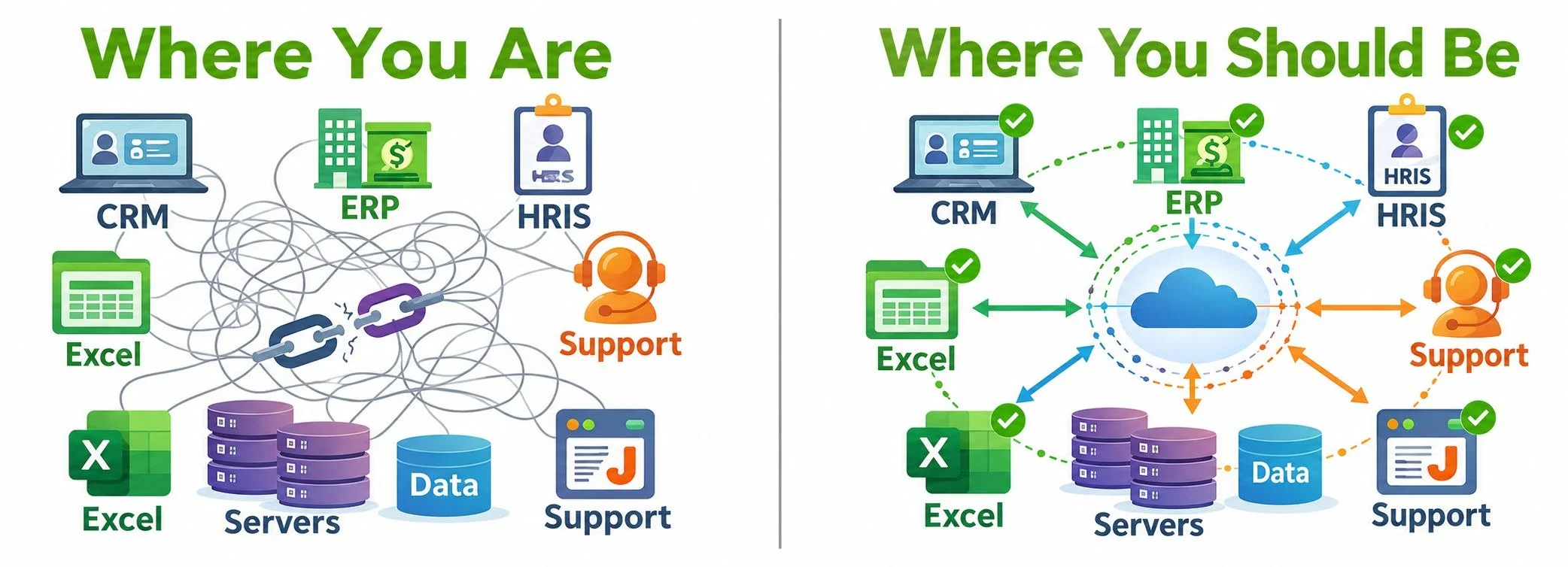
Integration doesn’t just connect your systems. It gives you a single version of the truth. By leveraging full tech stack integration, your team stops being a human middleware layer and starts doing work that drives revenue.
I’ve broken down technology integration into four levels of adoption. These can help you measure where your business currently stands.
Manual
People are the integration. Someone exports; someone else imports.
Point-to-Point
Systems integrate in pairs, but aren’t connected across the entire business. 5 systems might need 10 integrations.
Hub-and-Spoke
One platform routes data between all your systems. You may be interconnected but not fully automated or streamlined.
Real-Time
Things just happen. You focus on your core competencies while all data flows seamlessly.
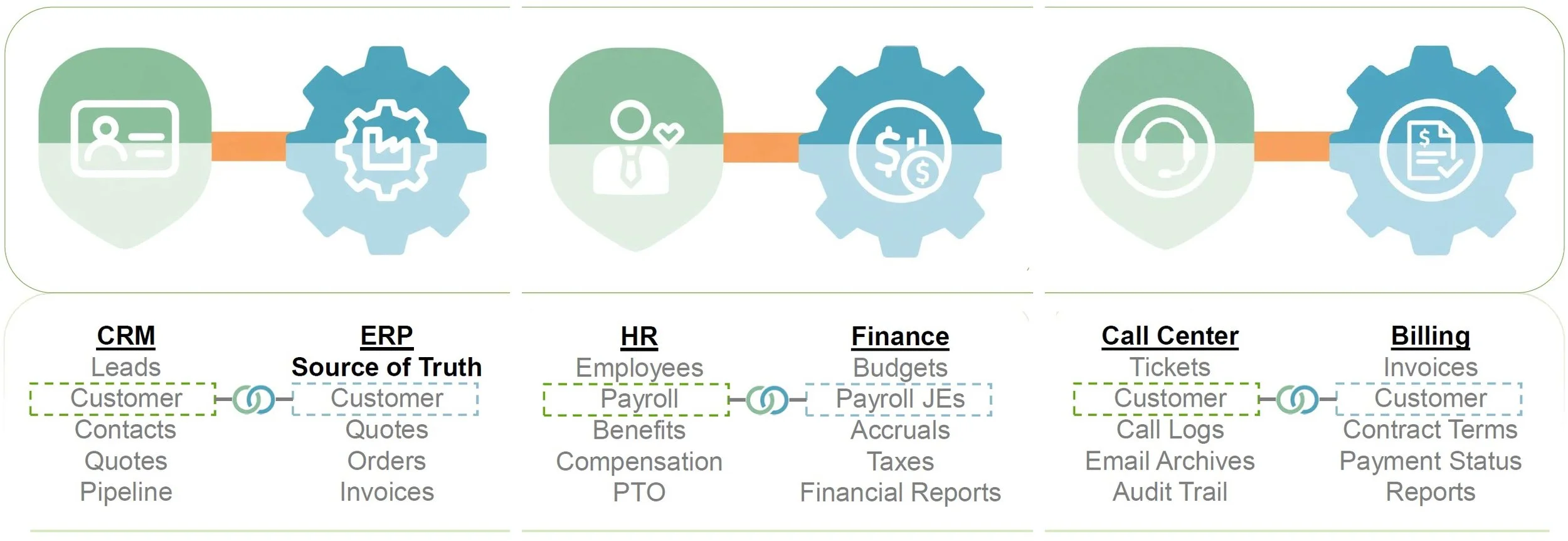
These three system pairings are common across industries, and disconnected data within each pairing can become costly:
-
Your sales rep closes a deal Friday afternoon.
Monday morning, someone in operations is manually re-keying that entire order into the ERP.
Until they’re finished, that order doesn't exist in the ERP.
-
You onboard new employees and have a large payroll with extra commission payouts.
Your controller is out of the office and hasn't entered the manual journal entries.
Your CEO relies on an overstated cash balance for forecasting because the underlying financial data hasn't been updated.
-
Your team spends four hours resolving a ticket.
That time needs to show up on an invoice.
But the ticket lives in one system, billing lives in another, and the gap between them is where you deliver work you never get paid for.
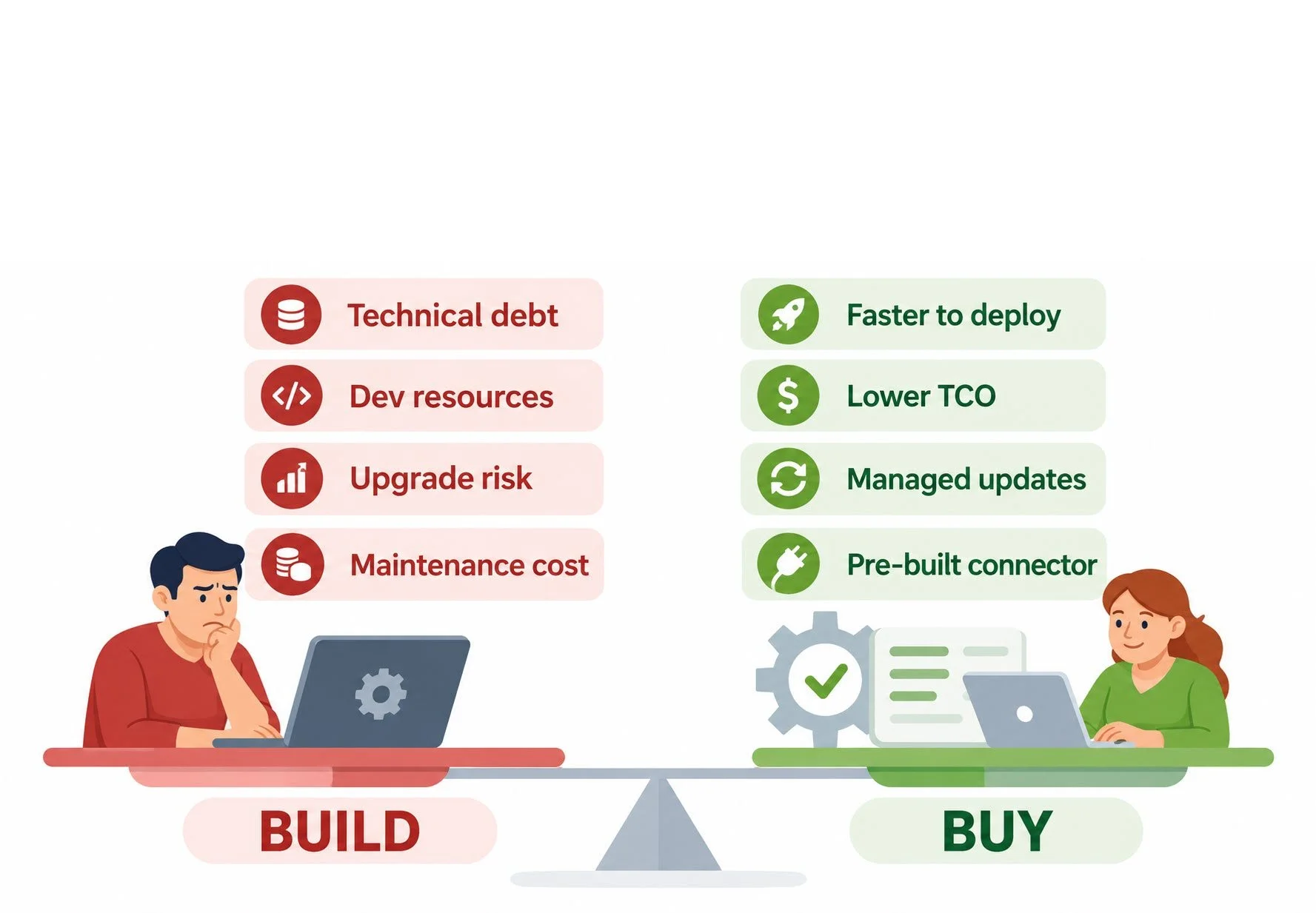
Build vs. Buy
Does a connector already exist?
If yes, buy it. You're not in the integration business. Stick to what you do best.
How unique is your business process?
If your process is truly unique, build. If you just think it's unique (and most people do), buy.
What happens when a system upgrades?
Custom code breaks, but managed connectors update. Pick which Monday morning you want.
⚠️ WARNING: Before integrating, here are some common issues to be aware of:
Data Quality
Integration amplifies data quality issues
Duplicate records can create friction and errors
Bad data in one system becomes bad data in every system
Before you integrate, scrub your data
Ensure your primary IDs/Keys are 100% accurate
This especially applies to items and customers (example: Item #/Customer #)
Ensure data imports have strong validation rules to avoid duplicates/errors
Security and Compliance
Every integration is a door into your business
The issue may not be data encryption itself, but rather not knowing every path your data travels
More connections = more places a breach can happen
For regulated industries, integrations can be auditable events:
If private data moves between systems, you need to prove where it went, when and who authorized it
When processing private data, a gap in one system is a gap in all systems
Technical Debt
“Technical Debt” Definition: the future costs associated with relying on shortcuts or subpar decisions during software deployment/development.
Most CFOs know their business’s financial statements like the back of their hand, including the ever-popular income statement and balance sheet. Sure, some physical goods (hardware/servers/PCs) may show up on the balance sheet as assets subject to depreciation, but what about software? Is software age tracked? How about duct-taped integrations? Is their aging status being tracked/measured? THIS is technical debt.
Software is no different than physical commodities because it does decay and atrophy when systems change, co-dependencies are updated, security patches alter performance, etc.
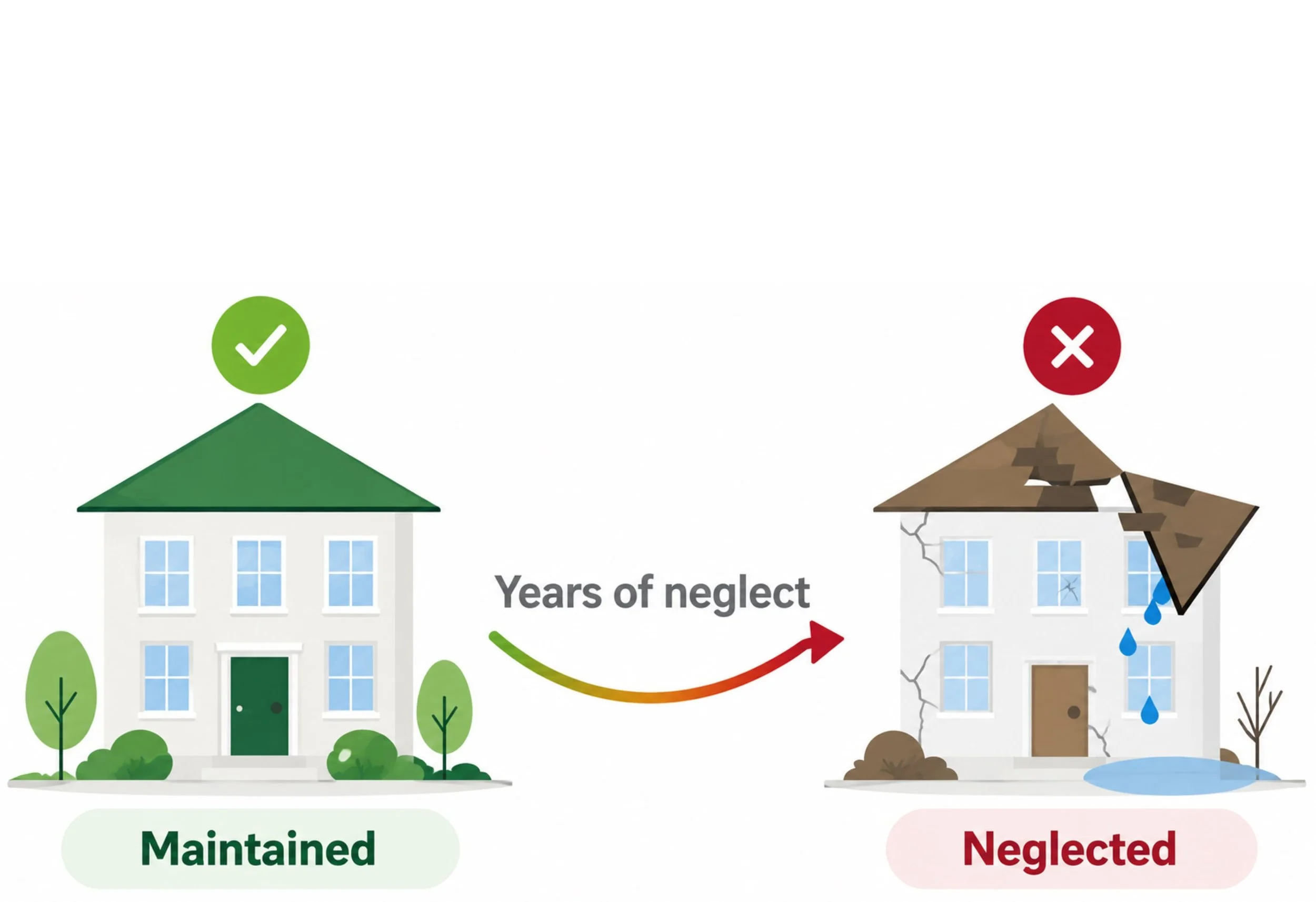
The Leaky Roof
I like to use the analogy of deferred/poor maintenance on your roof to explain technical debt.
If you skip this maintenance long enough, the roof starts leaking and eventually caves in.
The monthly cost of ignoring that pesky problem appears nonexistent… until it isn’t.
We already discussed the whole Build vs. Buy argument. One of the biggest financial risks of building technology solutions is failing to anticipate a project’s lifetime costs.
Sure, it might be cheap up front, but how about over time? Have you considered the maintenance costs for the solution? Be aware - even solutions in the Buy approach could degrade over time if you’ve purchased a subpar solution.
The takeaway here is that your software needs to be meticulously tracked and measured over time to ensure efficacy and strength.
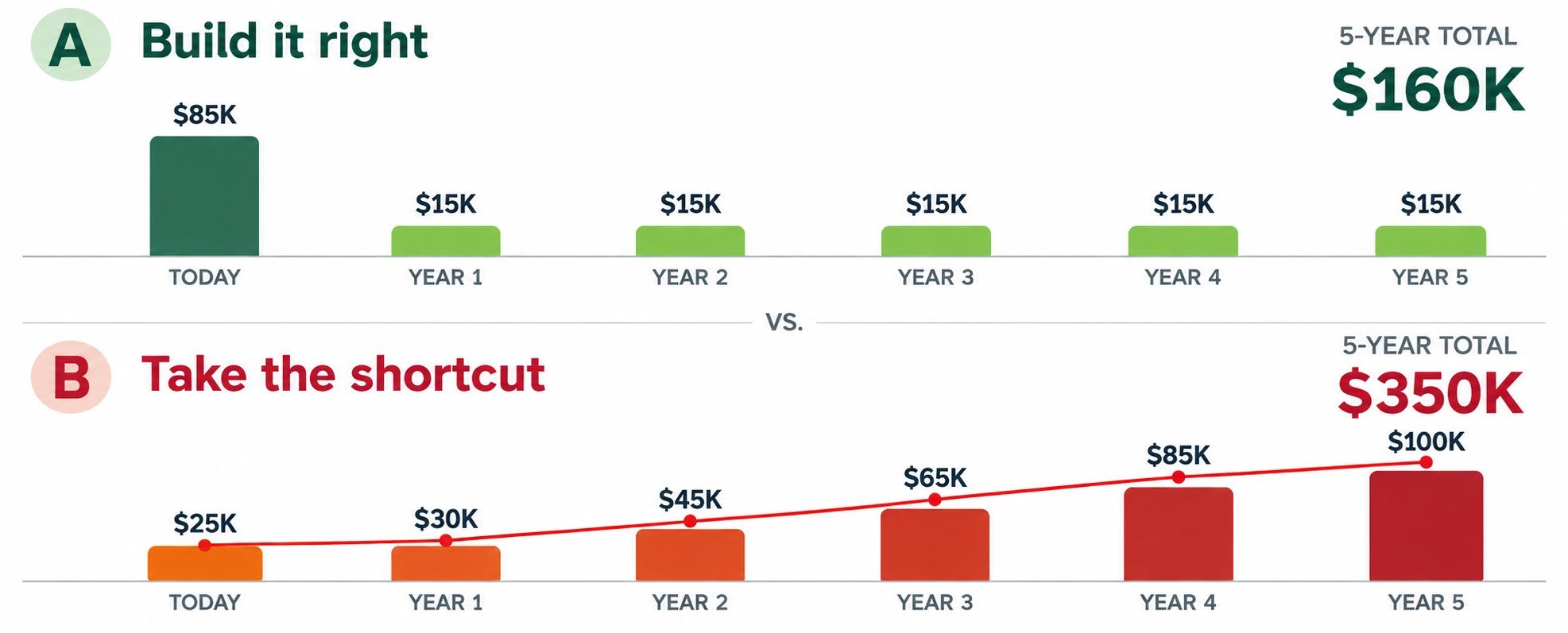
Measure each year’s potential impact on your technological investments
There are several ways to assess the health of your tech stack. One useful approach is the Technical Debt Ratio, which helps estimate potential risks in your technology investments. You can adjust this formula to fit your business.
| Formula | (Cost to Remediate / Cost to Rebuild) x 100 |
| Ideal | Less than 5% |
| Moderate Risk | 5-10% |
| High Risk | 11-20% |
| Severe Risk | More than 20% |
Let’s take this formula and apply it to a hypothetical existing integration from our ERP to an Amazon Marketplace Seller account.
Let’s say the cost to remediate an issue is $15,000 and the cost to rebuild it entirely is $50,000. Based on our formula, this would land the integration at a 30% (Severe Risk) debt ratio, making it a critical issue.
The main thing to consider here is when the cost to remediate outpaces the cost to rebuild.
Depending on your role with your employer, you’ll need to know how to address these issues with your C-Suite executives. Each one of them will have a different way of understanding the value and risk of technology in your business.

Don’t say:
|
Current Cost Terms:
|
Point them to this blog. ;) |
IT Coverage
30-40 years ago, this topic really would not have existed.
Business computing really wasn’t a thing, and there was no “IT Guy.“ As technology has improved and business adoption has become standard, the IT position has morphed several times. As we start talking about approaches to IT Team optimization, we need to understand the complexity of this industry.
When you see the lowercase “v“ before these C-level titles, it refers to “virtual“ – also sometimes called “fractional”, which means that the position is working for you part-time or on a contract basis.
Common IT Acronyms
► CTO – Chief Technology Officer
► CIO / vCIO – Chief Information Officer / v = Virtual
► CISO / vCISO – Chief Information Security Officer / v = Virtual
► MSP – Managed Services Provider
► SLA – Service Level Agreement
► FTE – Full-Time Equivalent
► KPI – Key Performance Indicator
► SME – Subject Matter Expert
► TCO – Total Cost of Ownership
► OPEX vs CAPEX (Operating Expenditure vs Capital Expenditure)
I want to discuss the three primary IT staffing models, calling out pros and cons and offering my first-hand recommendation. While there could be some slight variation here, this pretty much sums up how a business is going to approach servicing and supporting information technology.
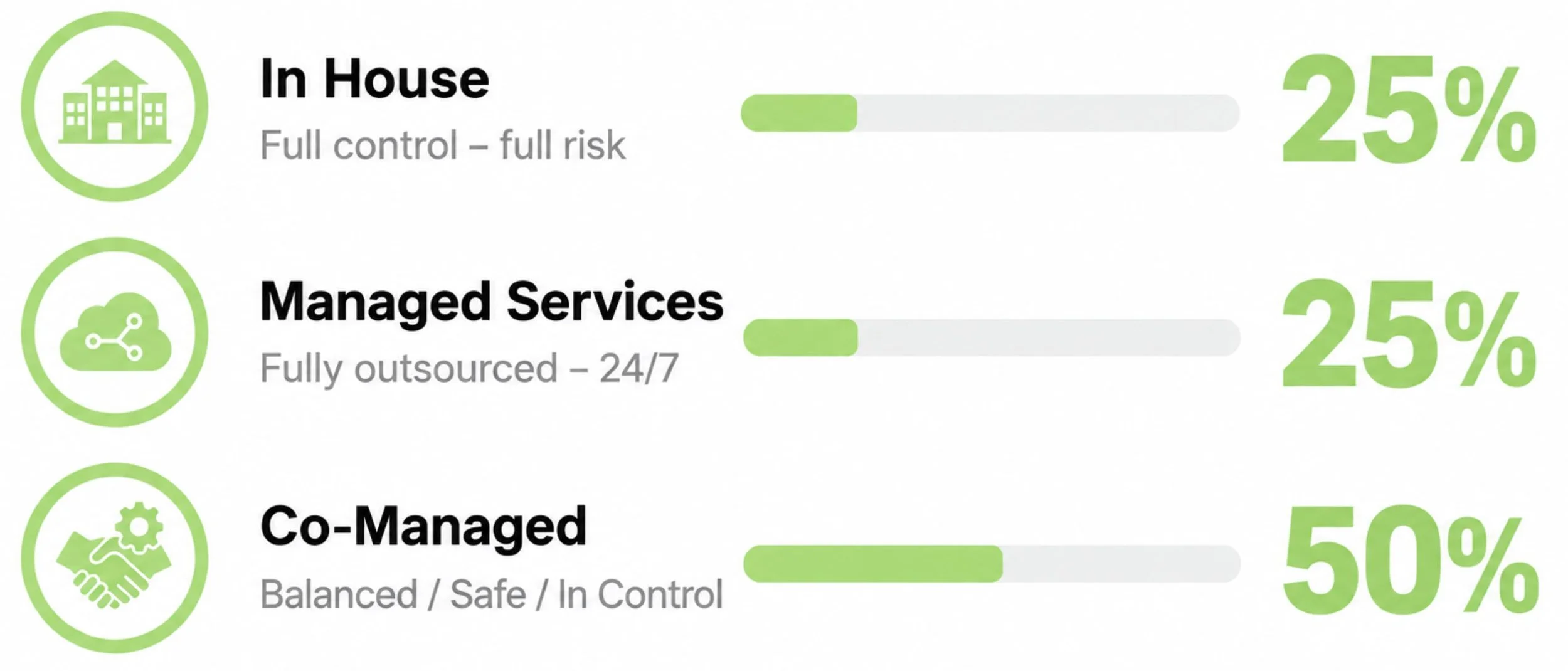
*According to Deloitte, Tech Report and Market Reports World
Let’s expand on the three models a bit.
Model 1 / In-House
This was the default option for the SMB market for decades… regardless of the size of your business, for years, everyone ran their own private IT team. Now, while there may be some benefits for larger-scale businesses, this is largely antiquated and has many pitfalls.
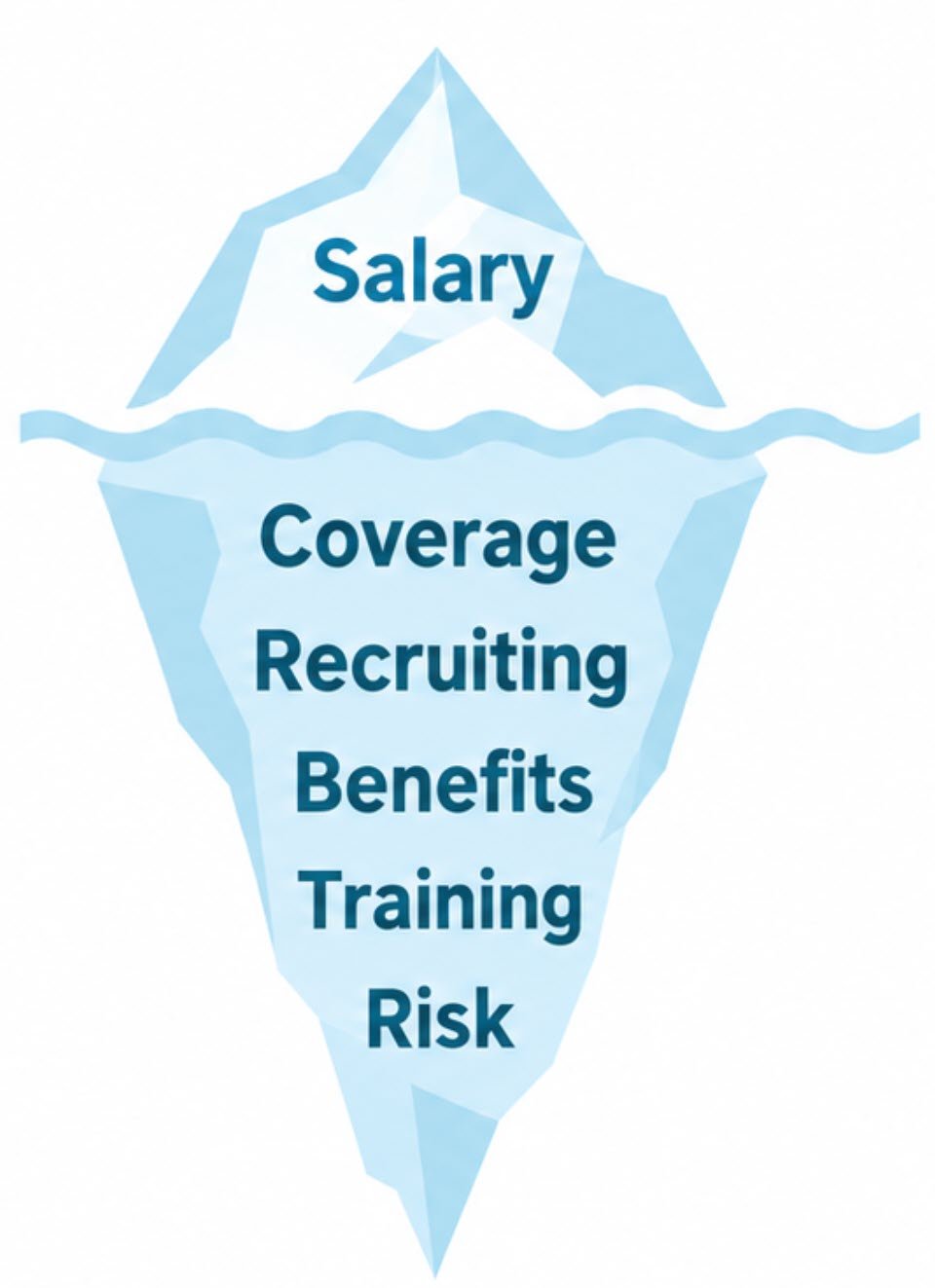
The Iceberg Effect
Visible Cost:
Base salary
Hidden Pitfalls:
Coverage gaps when staff are out, single point of failure, recruiting and replacement costs, and training/management overhead
—-
What happens when your only IT resource is sick, on vacation, overloaded, or leaves? This creates a single point of failure.
Most people don’t consider all of the additional costs of employing someone beyond their base pay. Aside from being the most expensive, it is also the riskiest, as I can personally attest. So, since it is the most expensive and the most risky, why do it? Well, simply put – control. You aren’t putting your destiny (and potentially your safekeeping) in someone else’s hands.
Individual IT employees can become single points of failure and may have knowledge gaps. Sure, they may be subject matter experts in certain categories (usually ERP Management), but since they are often generalists, other critical categories may be overlooked.
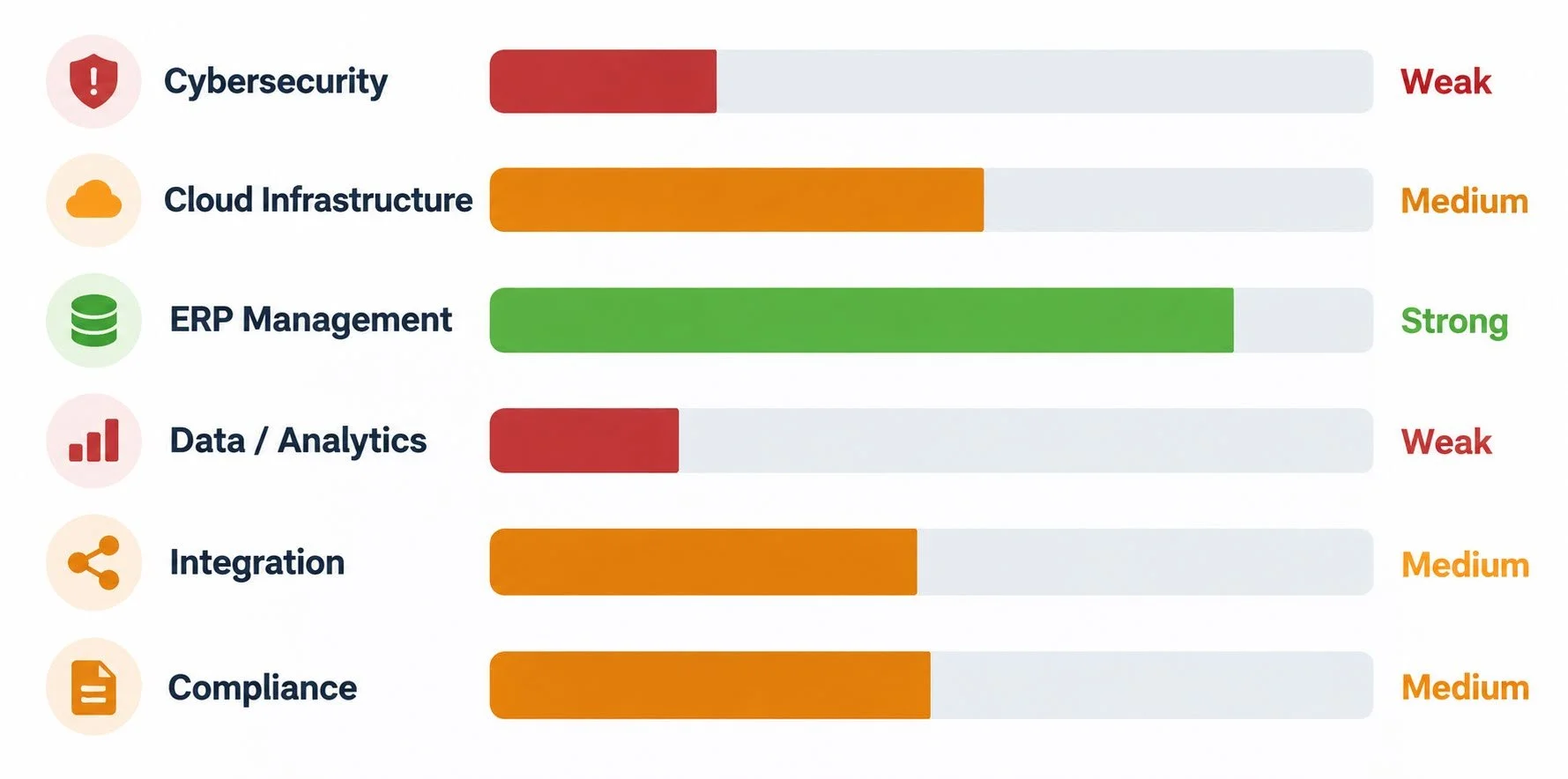
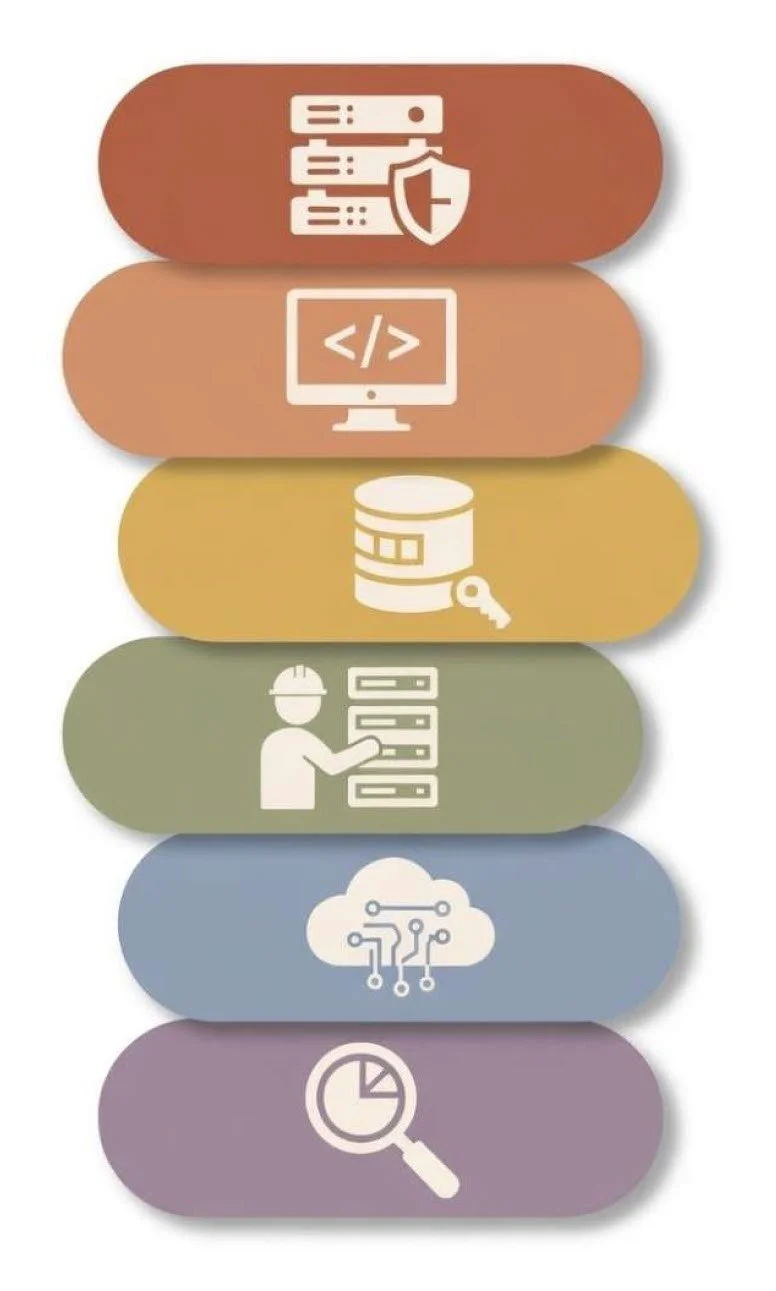
To be fair, there are areas where they definitely shine, but there are several areas where a larger team of experts can help optimize operations. Your In-House IT team’s capabilities may differ, but these six crucial categories can help identify where gaps exist.
Honest self-assessment reveals where your gaps really are and where you need help.
I want to draw special attention to the top item, Cybersecurity. This is often a weak area for In-House IT teams, yet it has become one of the most crucial elements in running a connected business.
Have you ever heard of the “Bus Factor”? It’s morbid, but it’s often used in IT risk analysis. If your IT staff disappeared (or got hit by a bus) tomorrow, would you be able to function as a business?
Do YOU know where the keys are? If not, you have a documentation problem that needs fixing before anything else. Your IT person may be the sole gateway between your business and all of the crucial data/access elements that keep it functioning.
Model 2 / Managed Services
OK – switching gears. We covered model #1 (In-House). Now let’s look at the second model, which is 100% outsourced Managed Services – this is where you virtually hand off ALL IT needs to another firm.
While this resolves several of the issues from the first model, it also opens up other concerns.
I’ve used this model myself and experienced both its benefits and drawbacks.

Outsourced IT
Benefits:
24/7 coverage, team depth, established tool stack and processes, no recruiting risk, low training/overhead
Hidden costs:
Scope creep, slow response outside the SLA, loss of tribal institutional knowledge
If your MSP doesn’t understand your business, they’re a help desk, not a partner.
There is an old saying: “Trust but Verify.”
Remember how I started this article by talking about how you learn through failure?
Time for me to be vulnerable:
In 2014, my trusted MSP partner for our eCommerce website had failed to apply security patches to our server for months, which resulted in a credit card breach - you can read more about it here.
This was especially frustrating because they acknowledged that security patching was required by our contract and SLA, yet they had completely failed to perform it. Sure, we rebuilt our server and ensured it never happened again with that particular MSP, but it cost a lot of money and the stress was immense.
All of this would have been avoided if they had done what they were contracted to do. Since I lacked the access and expertise to apply these security patches myself, I had to assume they were doing them.
Essentially, I gave up too much control and oversight.
This leads into the third model, which I believe to be the most holistic and healthy approach to IT.
Model 3 / Co-Managed
This is where we cue the angelic choir sound. :)
I’ve covered both ends of the spectrum: managing your IT needs completely In-House or outsourcing them through Managed Services. But – what if there was a balance of the two that combined the best parts of both?
Co-Managed is a perfect merge of the first two models.
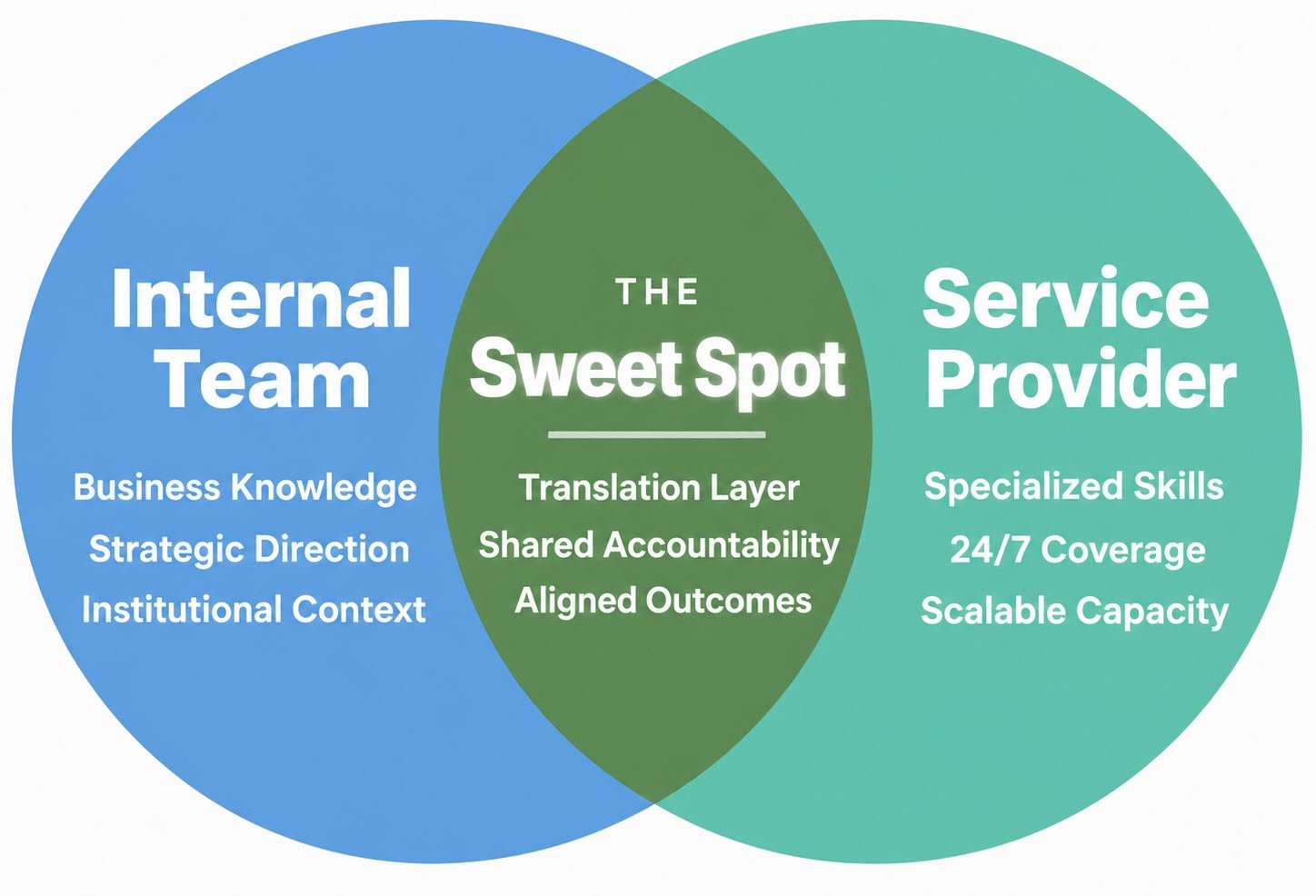
With Co-Managed, your internal team becomes a translation layer between business needs and your service provider.
This is the most holistically healthy model to adopt, and as mentioned earlier, roughly 50% of businesses have already adopted it. As technology improves, I expect this model to become even more prevalent.
Let’s focus on some critical Co-Managed Services facets to consider.
Fractional Economics
Let’s look at the costs of having a Fractional CIO. Again, “fractional” refers to a position that is part-time or contract-based. With the Co-Managed model, you still have someone acting as a high-level translation layer to ensure your business needs are handled by your point of contact at your MSP.
Your business needs strategic technology leadership, but you probably can’t afford a full-time executive. Using some industry-standard salary estimates, we can see a significant difference between these options. Pricing for a virtual Chief Information Officer often includes system and server monitoring, help desk support, antivirus protection, and more.
✅ How you win: a full-time CTO might cost you $150-250K/year loaded (total expense), whereas a Fractional vCIO (remember those acronyms?) at 10-15 hours/month might land at $60-120K/year
Structuring for Control
Co-Managed solutions put you in the role of a contractor, and your MSP fills the role of subcontractor.
Because you never want to give up total control of your business goals and objectives when you outsource ANY portion of your operations, it is very wise to deploy accountability frameworks like RACI.
A well-structured RACI Chart assigns ownership, balances workloads, and makes decision-making easier. Clarity and communication are critical when it comes to your technological infrastructure.
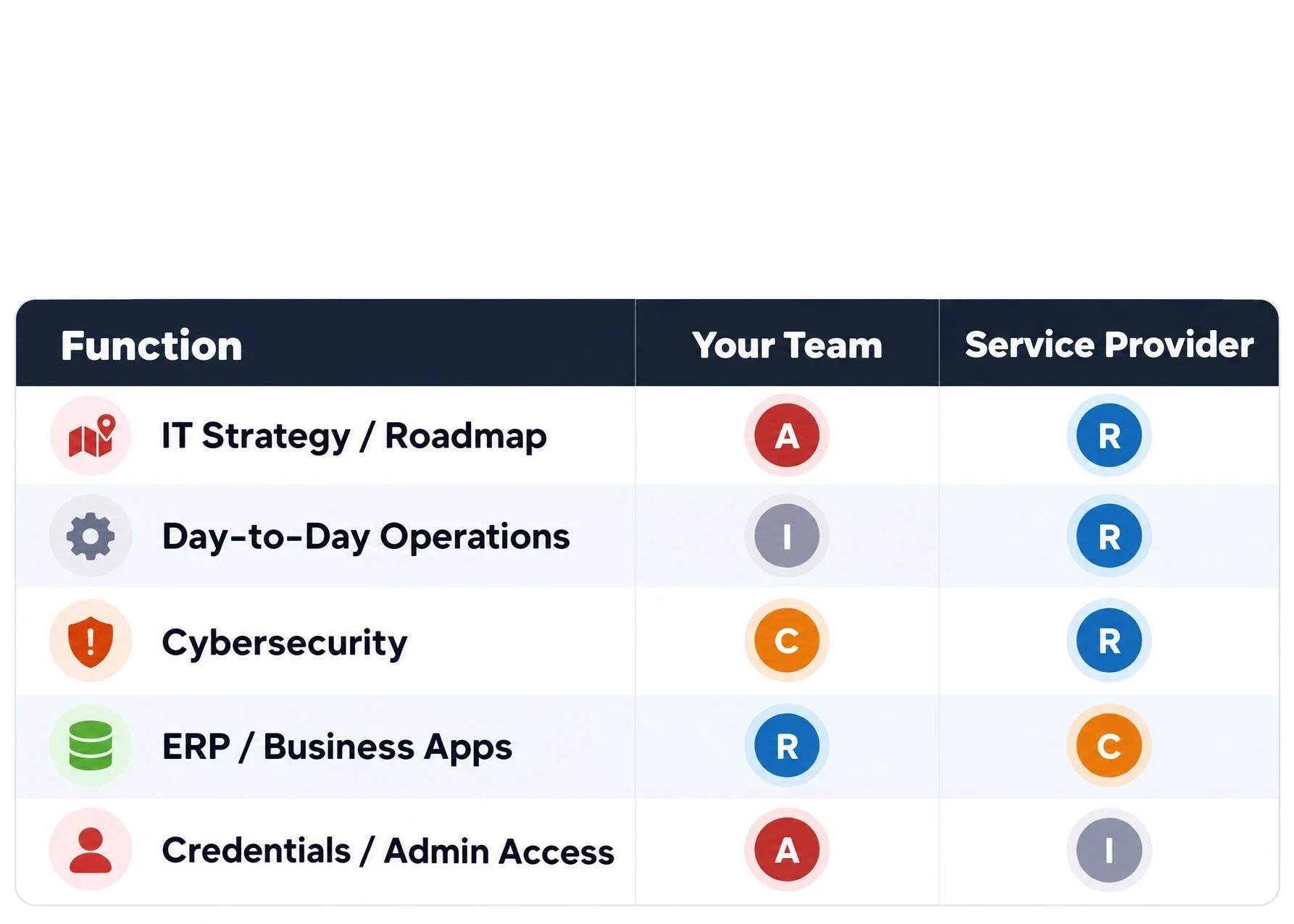
RACI Chart
Responsible (R): The person who performs the work or completes the task.
Accountable (A): The individual with authority who signs off on the task. Only one person should be accountable per task.
Consulted (C): Experts or stakeholders whose input is sought before completion.
Informed (I): Those updated on progress or results after decisions are made.
So, using Cybersecurity as an example, a well-defined RACI structure would clarify that your team is Consulted, providing input before decisions are made, while your MSP is Responsible for doing the work.
Vendor Selection
When you are interviewing your prospective Managed Services Providers, ask these questions and evaluate their answers for green or red flags:
“Do you understand our industry?”
Answer: “We support 12 companies using your same ERP right now.” ✅
Answer: “We work with companies across all verticals.” ⚠️
“Show me references at our scale.”
Answer: “Here are three clients your size. Call any of them.” ✅
Answer: “Our largest client is a Fortune 500 company.” ⚠️
“What happens when I call at 2 a.m.?”
Answer: “Tier 1 answers in 15 minutes. Here’s our escalation path to Tier 3.” ✅
Answer: “We have a 24/7 support line you can call anytime.” ⚠️
“What if we leave? How does knowledge transfer work?”
Answer: “90-day transition. Full runbooks transfer. It’s in the contract.” ✅
Answer: “Let’s not worry about that. We focus on long-term partnerships.” ⚠️
Vendor SLA Design
If you recall from the acronym section earlier, SLA stands for Service Level Agreement. This refers to an agreement executed by a business representative and the Managed Services Provider. This is not just a point of reference; it can also be a legally binding document to hold your partner accountable and ensure they are performing as intended.
This provides leverage to ensure they do their job, as failing to meet agreed-upon response times can have financial consequences. Keep in mind that an MSP is going to have a slight bias in the SLA and give themselves wiggle room, so you have to identify what you will accept and not accept.
An MSP that only reacts to tickets is a help desk, not a partner.
Some MSPs may prioritize saving time and effort, resulting in an unnecessarily lengthy issue-resolution process. They will never take your business as seriously as you do, so make sure you select a vendor who takes response time seriously.
You want them finding problems and developing clear remediation plans before your team even notices.
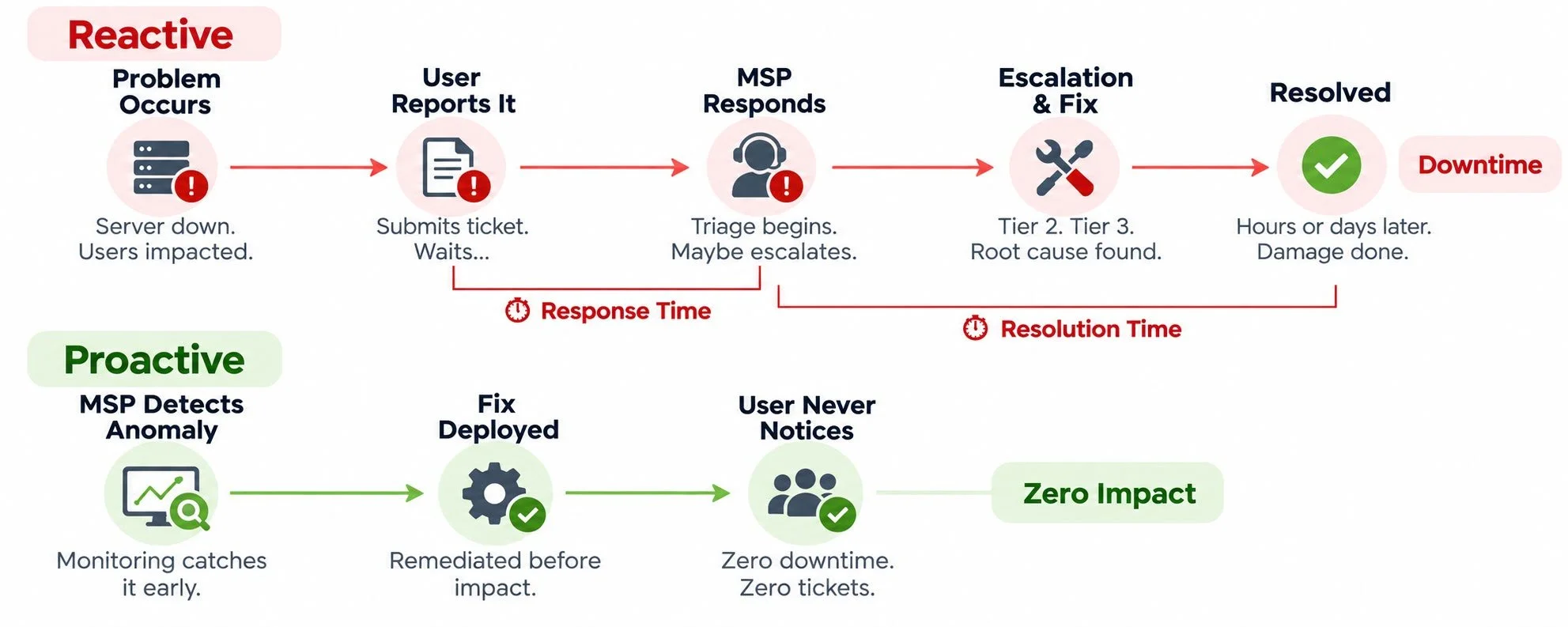
Make sure your SLA is focused on being Proactive and not Reactive. This could save or cost you thousands of dollars.
Summary of the Problem
I’ve outlined three distinct problems, but they are all connected and affect one another. They reinforce one another, so it is important to respect each one independently without ignoring the others.
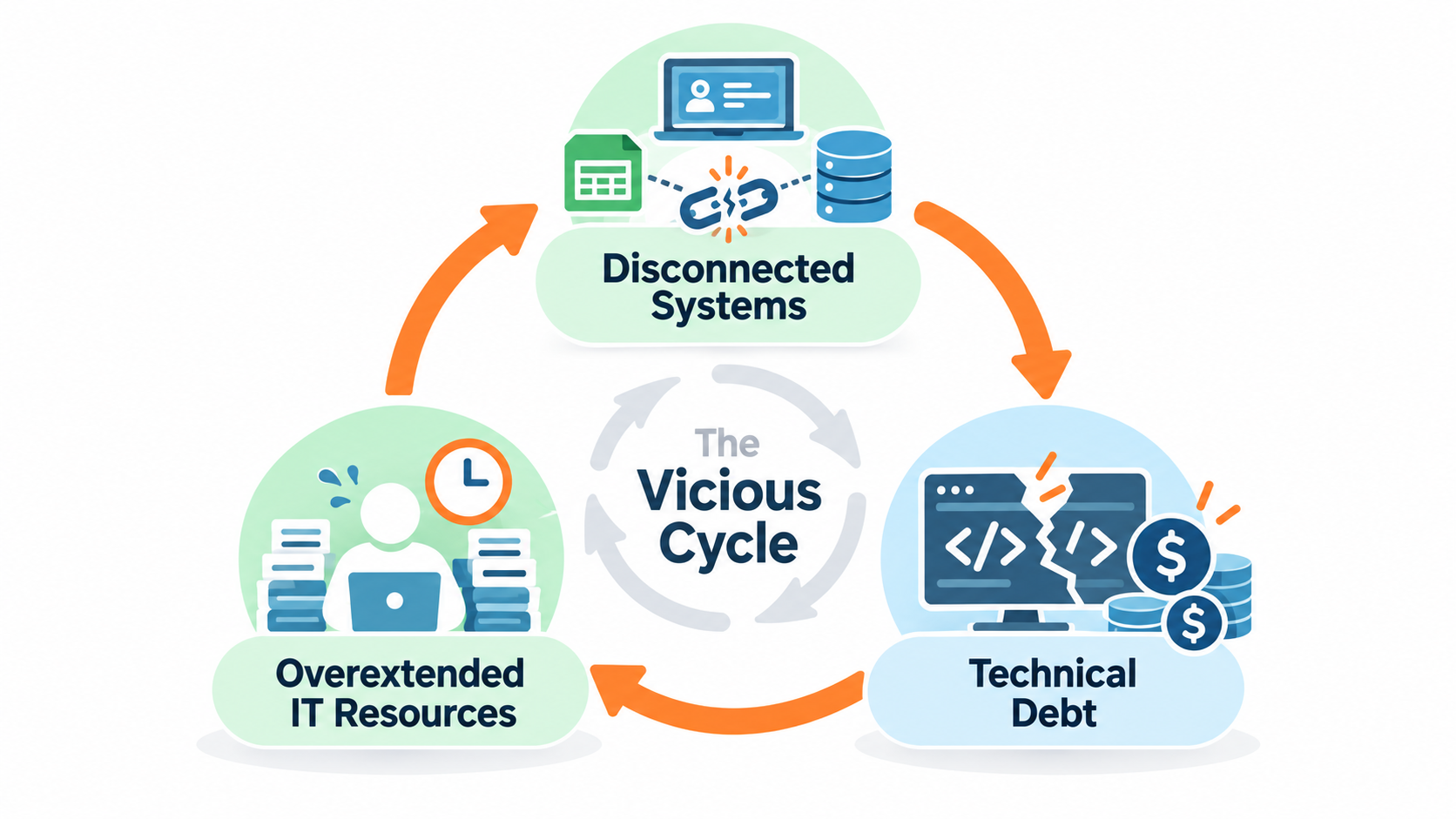
These aren't three separate technology problems. They're symptoms of an organization without a coordinated, long-term technology plan.
Action Plan
1) Assess your current environment
Audit applications, integrations, customizations, and dependencies.
Review IT staffing, skills, responsibilities, and documentation.
Identify redundant software and manual processes.
2) Prioritize intelligently
Risk-based versus opportunity-based investments.
Balance impact, urgency, and implementation effort.
3) Create a technology roadmap
First 90 days
Assess systems, stakeholders, documentation, and critical risks
3–6 months
Rank projects, eliminate inefficiencies, select integration opportunities
6–12 months
Deploy improvements, automate workflows, establish unified reporting
12+ months
Optimize integrations, measure ROI, continuously modernize
Repeat!
Technology is never finished. Continue to reassess your platform.
4) Measure the outcomes
Integration uptime and error rates.
Manual touchpoints eliminated.
Maintenance and downtime costs.
Productivity improvements.
A technology strategy should be measured by business outcomes, not the number of software features deployed.
Did I work for and own/operate a lighting distribution business? Sure… but I always communicated to colleagues, vendors and industry partners that I didn’t view us that way - “we were a technology business that just happened to sell lighting products.”
We led with technology.
We leveraged technology to run, grow and transform our business.
As you work on optimizing your relationship with technology, the real question isn't how much technology your business has. It's whether that technology is working for you—or you've started working for it.

If you made it this far, congratulations!
I know… that was a lot. But there is so much to consider as you embrace the use of technology in your business.
Hope you found some of these tips useful!
Find me on LinkedIn: